

🐾Step Functions for human-in-the-loop MLOps🐾
🤓You can automate almost every part of an ML workflow — except the human. Approvals are essential because few teams are comfortable pushing a model to production without someone reviewing the results first. The problem is that waiting for that approval can get expensive if you’re running resources or polling for state changes. Here’s how to pause a serverless workflow for as long as needed without paying for idle compute.
The core problem: waiting is expensive
In a modern MLOps pipeline, we often reach a critical point—such as before deploying a model to production, or tagging a batch of data—where a human expert must review the outcome.
In a serverless environment, implementing this manual gate traditionally presents a dilemma:
The Polling anti-pattern: Use a Lambda function that polls a database (e.g., DynamoDB) every minute until the human updates the status. This is inefficient, complex, and burns unnecessary compute costs.
The Container anti-pattern: Keep a container (EC2 or Fargate) running 24/7 waiting for a state change. This defeats the purpose of serverless and leads to high, fixed costs.
The solution must be both durable (it can wait days or weeks without failing) and cost-effective (we don’t pay for idle compute).
The Step Functions solution: callback task
AWS Step Functions is the ideal orchestration tool for this, specifically through its Callback Task pattern using the .waitForTaskToken integration.
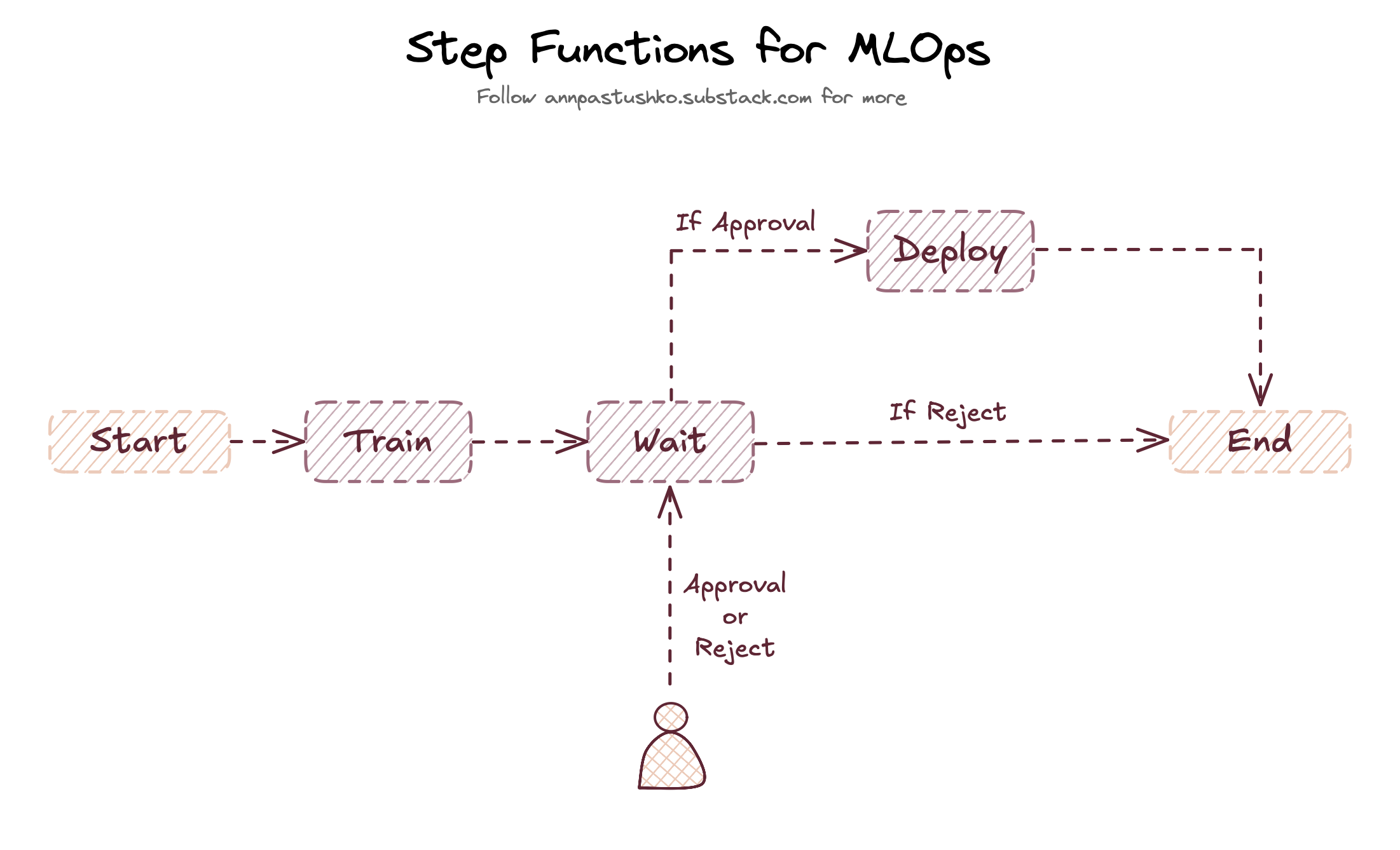
This pattern allows the State Machine to initiate an action (like sending a notification to a human), pause its execution, and wait indefinitely (up to one year) for a unique Task Token to be returned.
Process flow:
Trigger: The Step Function is initiated (e.g., by an S3 upload, scheduled Lambda, or commit event).
Pause: The State Machine reaches an AWS service integration configured with .waitForTaskToken. This service could be:
SNS/SQS: Send a message to a human-facing queue or topic.
Lambda: Invoke a Lambda that creates a message with the Task Token.
Human Action: The unique Task Token is passed to your external interface (e.g., a simple Slack message). The human reviews the data or model output.
Resume: When the human hits “Approve” or “Reject,” your external service calls the Step Functions API using one of two methods, including the original Task Token:
SendTaskSuccess: Workflow proceeds to the next step.
SendTaskFailure: Workflow terminates or enters an error handling state.
During the entire wait time, you are only charged for the State Transition (the start of the waiting state) and the duration of the wait in seconds, which is significantly cheaper than hourly compute.
Implementation Details
In your Amazon States Language (ASL) definition, you can add it with the following configuration:
 “WaitApproval” : {
        “Type”     : “Task”,
        “Resource” : “arn:aws:states:::lambda:invoke.waitForTaskToken”
        “Parameters” : {
           “Parameter_1”: "value",
           “Payload”: {
              “token.$”: “$$.Task.Token”
     }
   }
 }
By leveraging the Task Token, you can get a durable, auditable, and inherently cost-optimized serverless workflow component for the MLOps process. A full example of such an approval step can be found in the MLOps Serverless pipeline project.
🎁Add SLA to your approval flow
Add a TimeoutSeconds parameter directly to your callback task. When a timeout occurs, Step Functions throws a States.Timeout error. Use a Catch block on that error to redirect to an escalation state — send SNS to backup reviewers, or trigger a Lambda that sends a reminder or escalates to a team leader.
This ensures stalled approvals don’t become black holes. The timeout becomes your SLA enforcement mechanism, automatically escalating when humans don’t respond within your defined window. It also reduces charges for the State Transition.
Thank you for reading, let’s chat 💬
💬 Beyond Step Functions, what is your preferred orchestrator for MLOps pipelines, and why?
💬 What is your solution for implementing an approval step in the pipeline?
💬 What is your best tip for creating a reliable MLOps pipeline?
I love hearing from readers 🫶🏻 Please feel free to drop comments, questions, and opinions below👇🏻
