

🐾Do you really need single-table design for DynamoDB?🐾
🤓 Single-table design has become the default recommendation for DynamoDB. Rick Houlihan's re:Invent talks turned it into gospel — teams now force everything into one table because "that's how you're supposed to do it." But after working with DynamoDB implementations for several years, I've seen this pattern cause problems when applied blindly — operational costs often outweigh theoretical benefits.
AWS’s recent documentation emphasizes “consider your operational needs” and warns about added complexity. It’s less “always single-table” and more “use it when access patterns align.”
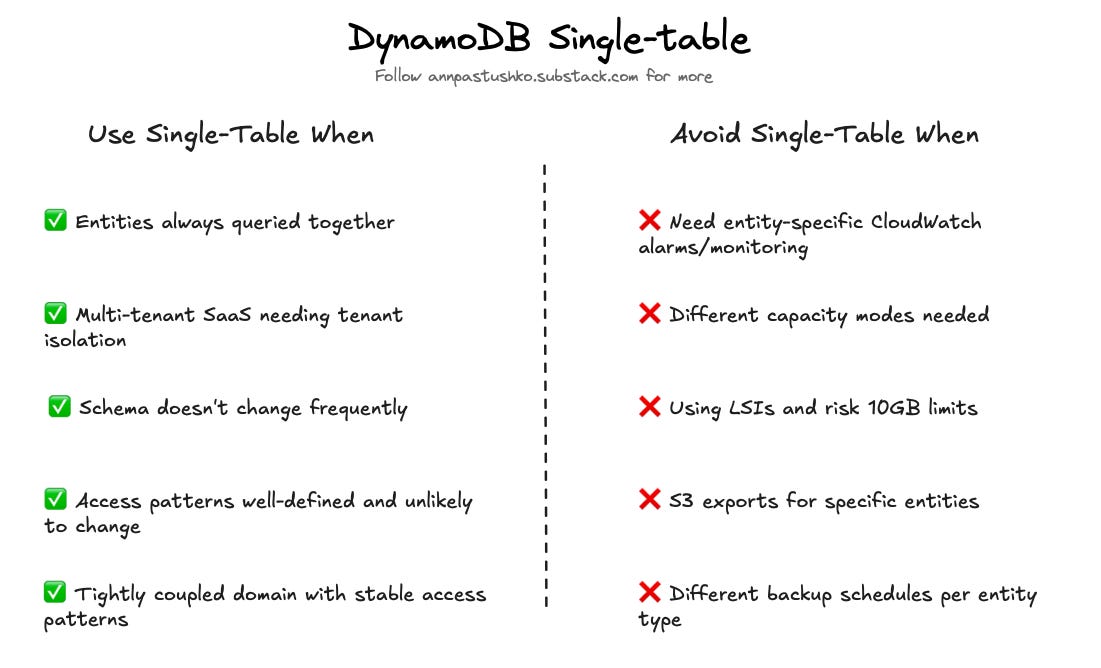
❌ Lost operational flexibility
Single-table design locks you into one configuration for all data types. Every entity shares the same capacity mode, backup schedule, table class, and TTL settings.
I worked with a team that had user profiles needing on-demand capacity for spikes, plus historical analytics that could use provisioned capacity. Single table forced on-demand for everything. The monthly bill was 3x higher than needed. Another team needed hourly backups for transactions, but only daily for audit logs. A single table meant backing up everything hourly or risking data loss. Storage costs doubled.
Tip: Separate tables let you use on-demand for hot data and Standard-IA class for cold data at 50% savings.
❌ The observability nightmare
You can’t CloudWatch alarm on specific entity types — when read capacity spikes, you’re guessing which entity caused it.
S3 exports also become painful. One team wanted to analyze user behavior, but had to export everything — users, orders, inventory, and sessions. Each export took 45 minutes and cost $8. Table scans are even worse; migrating one entity type means scanning and paying for millions of irrelevant items.
Tip: Separate tables give entity-level metrics and exports. Alarm on user table throttles specifically and export only what you need.
❌ Development complexity tax
New developers take weeks to understand single-table schemas. Every entity needs composite keys: User-{id}, Order-{id}, Inventory-{sku}. You end up with GSI1PK and GSI2SK everywhere.
One team spent two weeks adding a “query by order status” feature. They needed a new GSI and had to migrate all items to include the new key, coordinating deployment across services. With separate tables, adding a GSI is one simple schema change on one table. No migration, no coordination.
❌ When parallel requests beat complex queries
Single-table design is optimized for fetching related data in one query. But modern frontends fire parallel requests — and two simple queries might be faster than one complex query with heavy filtering.
A team I worked with had a dashboard showing user details plus recent orders. The single-table query was complex: fetch user by PK, query GSI1 for orders, then filter by date range. Total latency: 120ms. We tested splitting it into two separate tables with parallel requests. User fetch: 40ms. Orders fetch: 45ms. Total latency: 50ms because the frontend made both calls simultaneously. Your mileage will vary — it depends on backend orchestration and whether you need atomic reads.
Tip: Network latency is low. Two parallel 50ms queries often beat one 120ms query — especially since you can cache them independently.
❌ The 10GB partition limit
If you choose to use Local Secondary Indexes, DynamoDB limits item collections to 10GB per partition key. Not all single-table designs use LSIs, but when they do, the concentrated data makes this limit easier to hit.
One team stored user data with LSIs for sorting. When active users exceeded 10GB of data (including all related items), writes started failing. They had to partition users across multiple “user shard” keys — adding complexity that multiple tables would have avoided entirely.
❌ GraphQL’s contradiction
STD forces you into “lookahead” resolvers to fetch nested data in one query. I saw a team turn a simple field addition into a week-long project because the lookahead logic and query builders were so tightly coupled.
Tip: Simple resolvers with separate tables lead to cleaner, more maintainable code than complex “all-in-one” queries.
✅ When single-table actually makes sense
Single-table design works well for tightly coupled domains with stable access patterns. If you’re building a multi-tenant SaaS where tenant isolation is critical, or your entities are always queried together (user + preferences + settings), single-table can be the right choice.
The problem isn’t the pattern itself — it’s treating it as the default instead of a tool for specific cases.
Thank you for reading, let’s chat 💬
💬 Have you been forced into single-table design when separate tables would have been simpler?
💬 What's your take on the development complexity vs runtime performance?
💬 Have you hit the 10GB partition limit?
I love hearing from readers 🫶🏻 Please feel free to drop comments, questions, and opinions below👇🏻

Love how this challanges the single-table orthodoxy. The operational cost examples really hit home, especialy the backup scenario where you're forced into hourly backups for everything or lose granularity. I've seen teams go multi-table after hitting similar issues and it makes monitoring so much cleaner when throttles happen.